
Good ecommerce SEO for category and product pages comes down to four things done in order: fix your taxonomy, write real content, clear up technical crawl issues, then link it all together internally. Most Australian stores bleed traffic because category pages carry a paragraph of filler text above a product grid and nothing else, and product pages get duplicated across colour or size variants until Google cannot tell which one to rank. A store selling kids’ shoes might have twelve near-identical pages for the same sneaker in different sizes, all fighting each other in search results instead of one page actually winning.
None of this gets fixed by writing more blog posts or chasing backlinks. It gets fixed by deciding what your category structure should be, giving each page a reason to exist, making sure Google can crawl and index the right version of each product, then pointing internal links at the pages that should carry weight. That sequence matters more than any single tactic inside it, because doing content work on a category page that search engines cannot crawl properly wastes the effort.
Table of Contents
Why Category Pages Carry More Weight Than You Think
A product page for “Nike Air Max 90 Men’s Size 10 Black” only ever gets searched by someone who already knows what they want. A category page for “men’s running shoes” catches everyone upstream of that decision, which is why it usually holds the bigger keyword pool and the higher monthly volume.
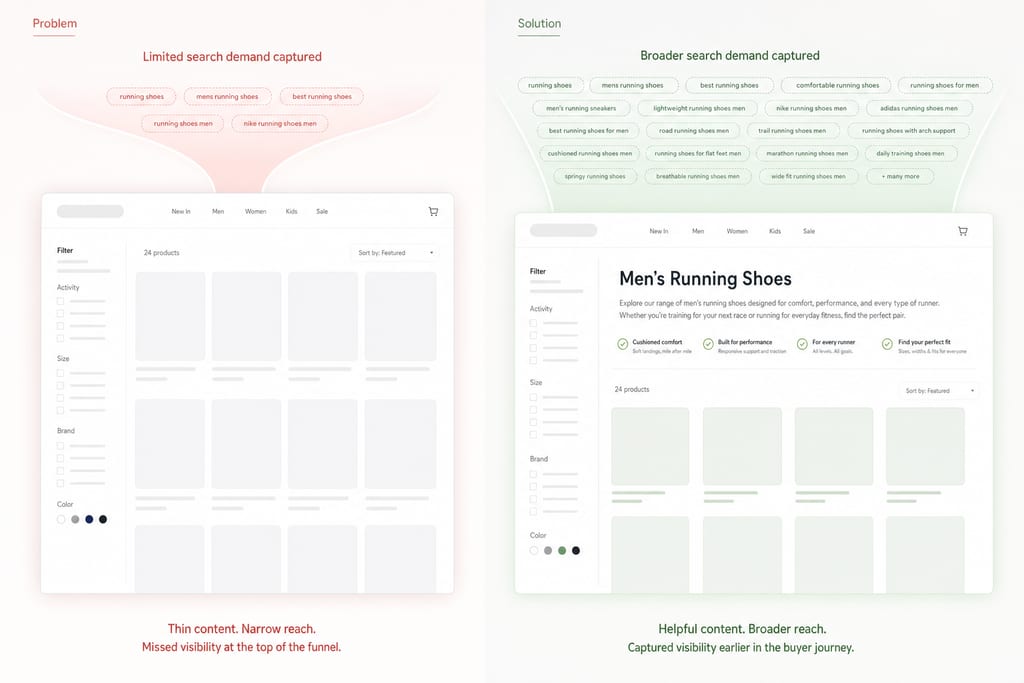
Most Australian stores leave that page blank. The grid loads, a filter sidebar sits there, and the only text on the page is a product count or a breadcrumb trail, so Google has almost nothing to match against a search query.
| Page type | Typical search intent | Average word count on AU stores |
|---|---|---|
| Category page | Broad, comparison, “best of” style | 40-80 words |
| Subcategory page | Narrower browsing, still pre-purchase | 20-50 words |
| Product page | Specific item, ready to buy | 150-300 words |
That gap runs backwards. Stores pour copy into product pages, which only ever target one SKU at a time, while the page with the widest reach gets the least attention. A short audit of your own category pages against that table will show you where the easy fix sits, and the ranking factors behind it are worth reading up on in the SEO Playbook on building content that ranks.
Build a Category Structure Google Can Actually Crawl
A category page ranks only if Google can reach it in a few clicks and work out what it is for. The simplest fix is keeping every category within three clicks of the homepage, because pages buried deeper than that get crawled less often and rank slower, no matter how good the copy is.
Faceted navigation is the other common wreck. A filter for colour, size, brand and price can generate thousands of near-identical URLs for the same handful of products, and Google treats most of them as thin duplicates competing against each other. Canonical tags pointing filtered URLs back to the main category page, plus noindex on combinations like “red size 8 shoes”, stops that bleed without removing the filters shoppers actually use.
Naming matters just as much as structure. Call the page what Australian shoppers type, not what your warehouse team calls it internally.
- Check each category sits three clicks or fewer from the homepage
- Audit filter combinations for duplicate indexed URLs
- Apply canonical tags to size and colour variant pages
- Rename categories to match search terms, not internal product codes
Write Category Copy That Actually Ranks
Thin category pages fail because they give Google nothing to match against a search, and they give shoppers no reason to trust the page. The fix is 150 to 300 words of genuinely useful copy, placed above or below the product grid, covering the main keyword plus two or three related terms a shopper would also search.
Useful means buying guidance specific to that category, not generic praise. A page for men’s running shoes should mention cushioning differences, half-size fit advice, or which models suit wide feet, because that is the information a shopper is actually missing before they filter the grid.
Filler paragraphs written to hit a word count, repeating the category name five times with no new fact, do the opposite of help. Google can tell the difference, and so can the shopper who bounces straight back to the search results.
- Write to a word count, not a keyword count
- Answer one real buying question per category
- Name specific materials, sizes or use cases, not “great quality”
- Place copy where a shopper would actually read it, not buried below ten rows of products
Fix Product Pages That Duplicate Themselves
Product pages usually fail for one of two reasons: the content is a duplicate of something else on the web, or it is missing the markup that lets Google show it properly in search. Colour and size variants are the biggest culprit, because a store that generates a separate URL for every size creates a dozen near-identical pages fighting each other for the same ranking spot.
Manufacturer descriptions make this worse. If your supplier’s copy sits on fifty other retailer sites, Google has no reason to rank your version of it. A unique description, even a short one, written around how the product is actually used, beats a copy-paste every time.
Product schema markup is the other piece. It tells Google the price, stock status and review count so they can show up directly in search results, which lifts click-through even before the shopper lands on the page. Image alt text and file names should describe the actual product too, not a generic “IMG_4821.jpg”.
- Consolidate variant URLs under one canonical product page where possible
- Replace manufacturer copy with a short original description
- Add product schema for price, stock and reviews
- Rename image files and alt text to match the product, not the upload batch
Link Your Pages So Authority Flows Where It Matters
Internal links decide which pages Google treats as important, and most ecommerce stores waste that signal on a sidebar widget nobody clicks. Linking from blog or guide content straight into the relevant category page passes weight to the page that actually needs to rank, instead of leaving it to sit on its own.
Breadcrumb navigation should run the same way on every page of the store, because it gives Google a consistent map of how categories relate to each other. Related products and categories should link to each other directly too, not just through a “you might also like” carousel that search engines often ignore.
Orphan product pages, meaning pages with no internal links pointing to them at all, are the easiest win on this list. If a product only shows up through search, a crawl, or a sitemap, Google has little reason to treat it as worth ranking.
- Link guide and blog content into the category pages they support
- Keep breadcrumb structure identical across the whole store
- Cross-link related products directly in the page body
- Run a crawl to find and fix orphan product pages
A full technical crawl can surface most of these problems in one pass, which is why stores unsure where to start often begin with a AI SEO check before committing to a rebuild.
Fix the Structure First or Waste the Content Work
Most Australian stores start with the wrong fix. A team notices a product page isn’t ranking, rewrites the description, adds a few extra words, and moves to the next product. Meanwhile the category page above it is still thin, still buried four clicks deep, and still fighting its own filtered URLs for the same keyword.
Shopify and WooCommerce both generate faceted navigation by default, throwing out colour, size and price combinations as separate crawlable URLs the moment a store adds more than a handful of filters. Neither platform cleans this up on its own. Someone has to apply canonical tags and noindex rules manually, or the category structure stays broken no matter how much product copy gets rewritten on top of it.
The decision that actually matters is sequencing, not effort. A free Search Audit shows which pages are being crawled, which are indexed, and which Google has quietly stopped bothering with, before anyone spends a day writing copy that lands on a page search engines can’t reach.
| Starting point | What you fix first | Who it suits |
|---|---|---|
| Product-level rewrites | Descriptions, one SKU at a time | Stores with clean category structure already |
| Faceted navigation cleanup | Canonical tags, noindex on filter URLs | Shopify or WooCommerce stores with large catalogues |
| Search Audit first | Crawl, index and orphan page data | Stores unsure which pages are the problem |
The cost of skipping the audit isn’t dramatic, it’s slow. Weeks go into content that sits on pages Google barely visits, while the category pages that could have carried that traffic stay untouched.
Pick Your Three Busiest Category Pages and Start There
Open Search Console, sort by organic traffic, and pull out your three best-performing category pages. Don’t touch the rest of the site yet. Check those three for thin copy under the grid, variant URLs competing against each other, and missing product schema, since those are the faults doing the most damage right now on pages Google already trusts. Fix those three properly before you move to page four. If you want someone else to find the faults first, a Search Audit from ScaleCurrent (hello@scalecurrent.com.au) will list exactly which pages need canonical tags, which need copy, and which need schema, so the next hour you spend goes on the fix, not the search.
Want more customers from Google and AI search? Tell us about your business.
Ecommerce SEO Common Questions
How long does it take for category page changes to show up in rankings?
Most stores see crawl activity pick up within a week or two of fixing canonicals and adding copy, but ranking movement usually takes four to eight weeks after that. Google has to recrawl the page, re-evaluate it against competing pages, then decide where it sits. Pages that were buried deep or blocked by thin duplicate URLs take longer, since Google has to unlearn its old view of the page first.
Will adding category page copy slow down my site or hurt conversion rates?
Text alone doesn’t slow a page down, images and scripts do that. Placed well, copy under or beside the grid doesn’t get in the way of a shopper who already knows what they want, it just gives the undecided ones a reason to stay. If conversion drops after adding copy, the placement is usually the problem, not the words themselves, so check where it sits on the page before cutting it.
Can I fix product page duplication without a developer?
Some of it, yes. Canonical tags and noindex rules on filter combinations can often be set through your platform’s SEO settings or a plugin on Shopify and WooCommerce without touching code. Consolidating variant URLs into one canonical product page, and rewriting manufacturer descriptions, is content work anyone on the marketing side can do. Schema markup is the piece most stores still need a developer or an app for.
Is ecommerce SEO different for a store with thousands of SKUs versus a small catalogue?
The sequence is the same, but the scale of the faceted navigation problem grows fast with catalogue size. A store with a few hundred products might have a handful of duplicate filter URLs, while one with thousands of SKUs can generate tens of thousands of them, which makes a crawl essential rather than optional before any copy work starts. ScaleCurrent’s Search Audit flags that scale difference early so the fix gets scoped correctly from the start.