
An ecommerce internal linking framework is just a set rule for how your pages point to each other, so Google and your shoppers can always find your best stuff in a couple of clicks. Most Shopify and WooCommerce stores never set that rule. Their best selling product sits five clicks deep, buried under a category page, a filter, and a sub collection nobody links to from anywhere else.
That buried product still earns money, but it earns less than it should, because the pages carrying the most link weight on the site, the homepage and the top categories, never send any of that weight its way. A proper framework fixes this by deciding, in advance, how the homepage, category pages, product pages, and blog or guide content all link down and across to each other. Once that structure is set, new products and new content slot into it without anyone having to guess where the links should go.
Table of Contents
Why Crawl Depth Makes Or Breaks Your Rankings
Crawl depth is just how many clicks a page sits away from your homepage. Googlebot allots a crawl budget to every site, and on a catalogue with thousands of SKUs, that budget runs out fast. Pages that take four or more clicks to reach often get skipped entirely on a given crawl pass.
Link equity is the ranking weight your homepage and top categories pass down through their links. A page with no incoming links from a strong page gets treated as low priority, no matter how good the product is. This is separate from the buried product example above, it applies to whole categories, filtered views, and seasonal collections that nobody points to.
| Click depth from homepage | Typical indexing speed | Ranking odds |
|---|---|---|
| 1-2 clicks | Within days | Strong |
| 3-4 clicks | Within a few weeks | Moderate |
| 5+ clicks | Weeks to months, or never | Weak |
Search Pilot’s internal linking case study research found that adding links to deep pages measurably lifted their traffic, which backs up why depth matters more than most store owners assume.
Build A Three-Tier Hierarchy From Homepage Down
A three-tier hierarchy means every shopper and every crawler can reach any product in two clicks: homepage to category, category to product. Keep it that flat and link equity has a clear, short path to follow instead of pooling at the top and never reaching the catalogue.
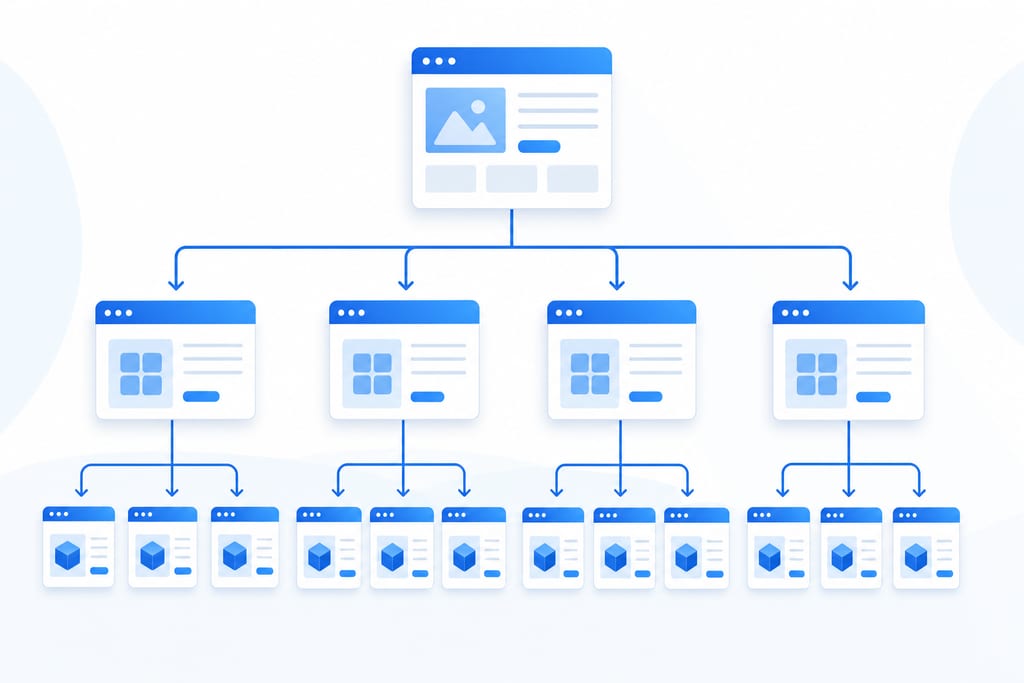
The homepage should link to top-level categories only, never to subcategories or filtered views. If a homewares store sells cookware, the homepage links to “Cookware,” the Cookware page links to “Cast Iron Pans,” and that’s where the product grid sits. Skip a tier and you’ve either buried the product again or cluttered the homepage with forty links nobody clicks.
Flat structures beat deep nested menus for ecommerce catalogues, even large ones with thousands of SKUs. Compare the two approaches before you build your nav:
- Flat: homepage, then category, then product, three clicks total
- Nested: homepage, then category, then subcategory, then filter, then product, five clicks total
- Flat structures index faster and spread equity to more product pages
- Nested structures hide low-traffic products from crawlers and shoppers alike
If your current menu has more than three levels, that’s the first thing to collapse before touching anything else.
Use Category Pages As Authority Hubs
Category pages carry the most link weight after the homepage, so they need to pass it on deliberately instead of scattering it. They should link to related categories and to the top-selling products inside them, not to every page they’re loosely connected to.
Avoid linking every category to every other category, since that spreads authority so thin none of them benefit. A short intro paragraph at the top of each category page, two to three sentences with two or three contextual links, does more work than a sidebar full of links. Breadcrumb navigation backs this up by telling crawlers exactly where a page sits in the hierarchy, which matters more on large catalogues than on small ones.
- Link each category to its closest three to five related categories, not all of them
- Feature your five best-selling products in the category page intro or grid
- Add breadcrumbs on every category and product page, not just some
- Write a short intro paragraph with two to three links to specific products or subcategories
Get this right and your category pages do double duty, selling the shopper and routing the crawler.
Stop Orphan Pages From Hiding Your Products
An orphan page is a product with zero internal links pointing to it from anywhere on your site. It can still sit in your sitemap and still get indexed eventually, but sitemap-only discovery is slow and gives Google no signal that the page matters.
New arrivals need a link from the relevant category page and, for a limited run, the homepage, within the first week of going live. Cross-link related products too: “bought together” pairs, same-brand items, and same-use-case alternatives all give a product extra inbound links without needing a dedicated campaign. Run this check monthly, not quarterly, since catalogues change too fast for a longer gap to catch new orphans in time.
- Pull a crawl report and flag any indexed product page with zero internal inbound links
- Check that every product launched in the last 30 days has at least one category link
- Add two to three cross-sell links to each orphan you find
- Re-run the crawl after fixes to confirm the orphan count has dropped
A monthly habit like this catches problems while they’re still cheap to fix, which is roughly the same logic behind a free AI check at AI SEO audits, finding the gap before it costs rankings.
Funnel Blog And Guide Pages Into Money Pages
Buying guides and blog posts only earn their keep if they push traffic into category and product pages, not just back to the homepage. A size guide, for example, should link straight into the relevant product category, not to a generic “shop now” button that tells Google nothing about what’s on the other end.
Anchor text matters here: “waterproof hiking boots” tells a crawler what the destination page is about, while “shop now” tells it nothing. Limit blog-to-blog links so guide content doesn’t just loop authority between articles while your commercial pages get none of it.
- Link each guide to one or two specific categories it discusses, with descriptive anchor text
- Cap blog-to-blog links at two or three per post
- Replace generic “shop now” anchors with the actual product or category name
- Review old guides quarterly to check the categories they link to still exist
Siteimprove’s internal linking guidance backs this pattern, noting that descriptive, contextual anchors carry more weight than generic calls to action. Your Internal Linking Blueprint For Better SEO
Decide What To Untangle First
Three set-ups cause most of the damage on Australian stores, and they rarely need the same fix. A sprawling mega menu with 200-plus links looks generous but spreads authority so thin that no single page gets enough to rank. Trim it to the top-level categories only and let the category pages do the linking work underneath.
Seasonal collections are a different problem. A Christmas or Black Friday collection gets built, linked from the homepage for a few weeks, then the links get pulled when the sale ends, leaving the page orphaned until next year. Keep a permanent link to it from a relevant category, even off-season, so it never drops to zero inbound links.
Auto-generated “related products” plugins create a third mess: they often link product A to B to C and back to A, with no page acting as the hub. That loop feels like linking but carries no hierarchy, so crawlers waste time in circles instead of reaching new stock.
| Setup | What goes wrong | Fix |
|---|---|---|
| Mega menu | Links to 200+ pages, dilutes authority | Cut to top-level categories only |
| Seasonal collection | Abandoned once the sale ends | Keep one permanent category link year-round |
| Auto related products plugin | Creates loops with no hub page | Manually set cross-sells by hand |
Of the three, fixing links usually moves faster than anything else on the page. Store owners who spend a few hours restructuring links tend to see Search Console impressions shift within weeks, well before a new content push or any backlink work would show up. If you’re not sure which of these three is actually dragging your site down, a local SEO audit will tell you, and that’s a cheaper first step than rebuilding your whole menu on a guess.
Pick Your Five Pages And Check Their Links This Week
Open your sales report and list your five highest-revenue categories and products, not the whole catalogue. For each one, check how many clicks it sits from the homepage and what anchor text points to it. If any of the five take more than two clicks to reach, or the links aiming at them say “shop now” instead of the product name, that’s your fix before you add a single new link anywhere else. ScaleCurrent’s free Search Audit will flag orphan and buried pages across the site if you want that check done for you rather than by hand. Either way, do it this week, while the revenue pages are still fresh in your mind and before the next sale or season buries them again.
Want more customers from Google and AI search? Tell us about your business.
Internal Linking Questions For Ecommerce Stores
Does internal linking still matter if I run paid ads for most of my traffic?
Yes, because paid traffic lands on one page and leaves, while internal links decide what happens after that visit. A shopper who clicks a Facebook ad to a product page still needs a clear path to related items or they bounce. Ads also cost money every time, while a fixed link structure keeps working on every visit, paid or organic, at no extra cost per click.
How many internal links is too many on a single product page?
Once you pass 10 to 15 links on a product page, each one starts carrying less weight and shoppers get fewer clear choices. A product page usually needs a breadcrumb trail, a handful of cross-sell items, and a link back to its category, which lands well under that number. If a page has more than that, check whether a related-products plugin is adding links nobody asked for.
Will fixing internal links break my existing URL structure or redirects?
No, changing which pages link to each other does not touch the URLs themselves. You are adding or removing links on existing pages, not moving or renaming anything, so no redirects are needed for that work. Redirects only come into play if you also restructure your menu and change URL paths, which is a separate job from fixing links.
Can I automate internal linking or does it need manual review?
Automated tools can find orphan pages and flag broken links fast, but the decision about which category links to which, and which five products deserve homepage links, still needs a person to make the call. ScaleCurrent’s free AI check uses automation to surface the problems, then a human reviews what it finds before anything changes on the site.


